
Ishin Roblox Beginner Guide: How to Start and Play
The Ishin Roblox beginner guide is a roadmap starting with earning cash at the pet cafe, purchasing an apartment, adopting a pet cat, and rolling a solid combat style.
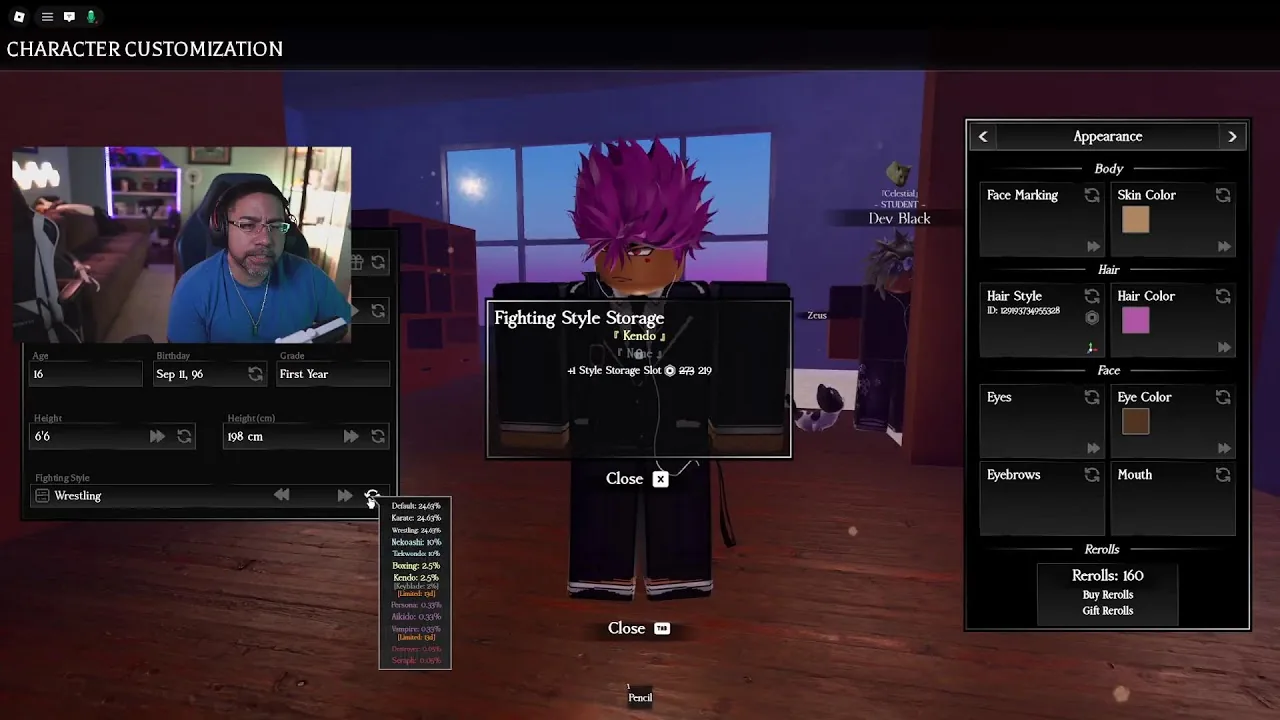
The Ishin Roblox beginner guide is a roadmap starting with earning cash at the pet cafe, purchasing an apartment, adopting a pet cat, and rolling a solid combat style.
Live the slice of life as a student with endless amounts of content, do whatever you want but don't be surprised if you end up in a trash can. — the official Ishin Roblox description
Created by the group luure, Ishin is a school-life fighting and roleplay experience hosting up to 60 players per server on the official Roblox game page. New students navigate a multi-story high school, an apartment residential complex, retail stores, and a bustling neighborhood.
How Do You Buy and Set Up an Apartment in Ishin?
Apartments are private living spaces purchased at the front desk that allow residents to set a permanent spawn point. A standard residential room costs 12,050 yen at the reception area. After completing the payment, head to the residential tower to find your assigned room number across the building floors.
- Open your game settings, select the Main tab, and switch the Spawn at Apartment setting to On so you load directly into your room.
- Enter your empty apartment and press the build mode button to browse structure, flooring, and furniture catalogs.
- Lay down flooring options such as wood for 1,000 yen or clean marble slabs, and raise interior partition walls to divide bedrooms and bathrooms.
- Press the Y key while highlighting an object if you want to store misplaced furniture back into your inventory.
- Grant building access to friends by clicking the ID icon in the build menu and entering their username.
Players who need to reset room permissions or fix desynced build tools can type /rejoin directly into the text chat to reload their room state. You can also explore house customization to plan out bed frames, chandeliers, living room televisions, and bathroom fixtures.
How Can Players Earn Money at the Pet Cafe?
The pet cafe shift is an active cleaning and customer service job that awards players 800 yen upon completion. New arrivals can find the pet shop and cafe on the ground floor of the town complex. To begin working, speak to the store manager behind the front counter and select the clock in dialogue option.
- Ring up customer purchases at the register when orders show up on screen.
- Search the cafe floor and tables to clean up dirty pet messes.
- Complete all designated tasks across the room to collect an immediate 800 yen wage.
Working regular shifts at the cafe offers a reliable route for how to make money without relying on outside player trades. Players who want to send cash directly to friends can pull up their in-game phone, open the Bank application, enter the recipient username, and transfer funds. The bank interface enforces a maximum transfer limit of 15,000 yen, a receiving cap of 10,000 yen, and deducts a 20% system tax on transactions.
Pet adoption also takes place in this shop. Cats cost 3,000 yen and require picking up your chosen animal, carrying it to the front desk, and typing a name onto the adoption certificate. Picked-up pet supplies deliver to boxed parcels right outside your apartment doorway:
- Unpack the food bowl and water bowl inside your apartment, then click the food dish to manually refill it.
- Buy a jingle ball or toy mouse from the pet shop, hold the toy in your hand, face your pet, and drop it to initiate play sessions.
- Feed treats and sit alongside fearful felines to practice how to gain cat trust until their loneliness bar decreases.
Which Activities and Fighting Styles Should You Focus on First?
Fighting styles are distinct combat disciplines rolled through the character menu to give players specific movesets. Ishin contains 12 unique fighting styles across varying rarity brackets. Beginners start with roll currency and can activate an auto-roll setting within the combat menu to cycle until a rare variant appears.
- Vampire represents a rare fighting style rolled at a 0.33% drop rate.
- Kendo provides traditional sword strikes and carries a 2% chance to drop with an exclusive keyblade weapon appearance.
- Aikido allows fighters to slide into an opponent using ragdoll forfeit followed directly by a heavy strike.
- Boxing offers straightforward hand-to-hand punches suited for standard street sparring.
Outside of combat encounters, the school campus hosts educational and creative clubs. In the science laboratory, sit at a desk and open the lab notebooks to brew potions that cause heads to swell, heads to shrink to the size of a pea, floaty high jumps, or blue body tinting. On the campus roof, players can participate in gardening by planting seeds into the large communal planter, watering soil beds, and pressing Tab to close the seed tray once flowers bloom.
What Gamepasses Are Available on the Store Page?
Store gamepasses are optional account upgrades sold for Robux that add visual adjustments and administrative tools. Players can review these upgrades on the Roblox experience page maintained by the official luure developer group.
| Store Gamepass | Primary Purpose | Robux Price |
|---|---|---|
| Accessory Adjustment | Repositioning, scaling, and rotating character accessories | 79 Robux |
| Custom Hair | Altering and personalizing avatar hairstyle appearances | 49 Robux |
| Private Server Commands | Opening the administrative control panel by pressing Tab | 55 Robux |
These add-ons provide cosmetic flexibility and moderation convenience for group roleplay sessions without gating core school activities or apartment ownership.
Next step
Customization Options
Discover how to customize your character's accessories and home in Ishin to personalize your in-game identity.
Related Guides
Ishin Roblox Character and House Customization; Ishin Roblox Gamepasses: Prices and Features